Android’s app info screen shows a handful of facts. AppDash shows where an app came from, what it can do, what it costs you in time and storage, and how it has changed.
Everything on one page
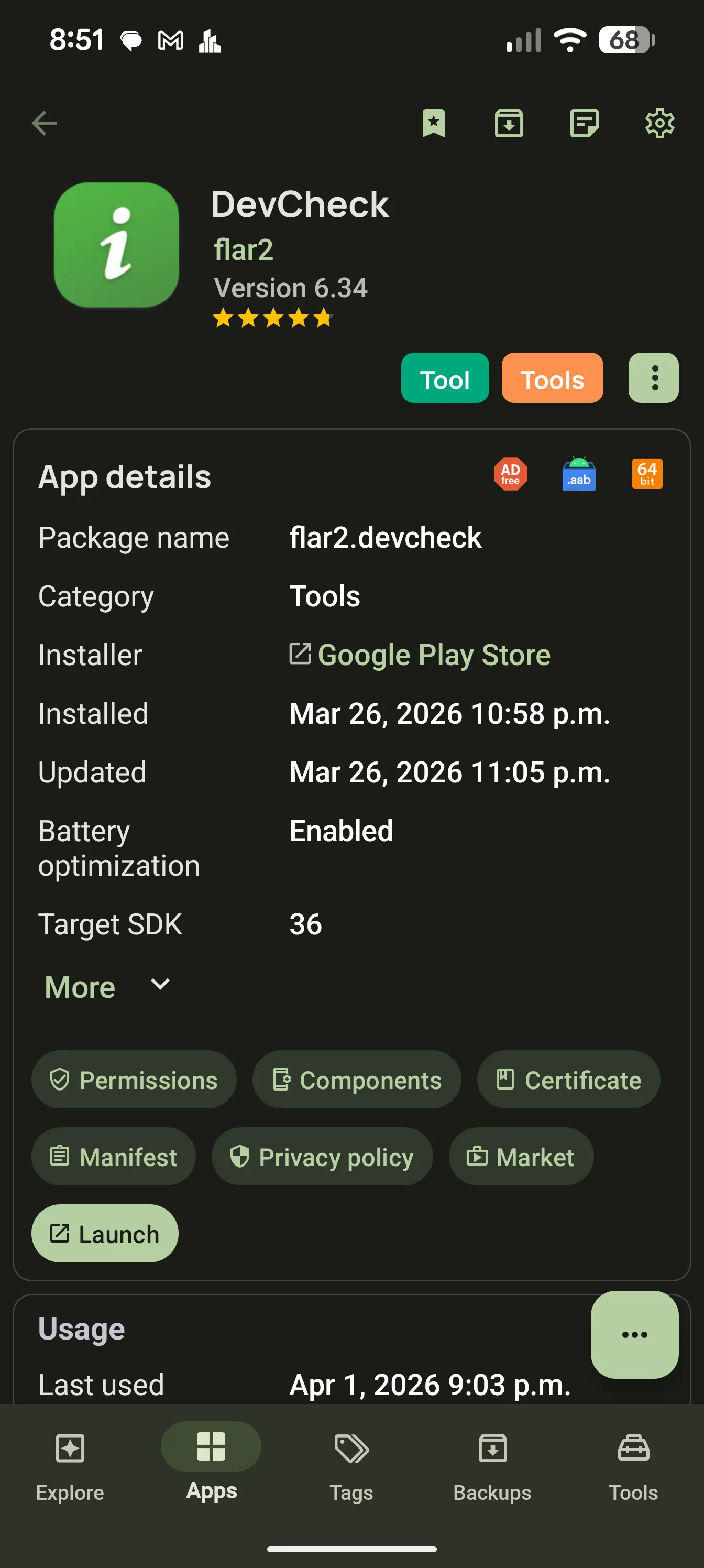
Package name, installer and installer type, install and update dates, target and minimum SDK, version code, size, UID, primary ABI with native libraries, and whether the app is disabled, paused, hidden or archived. Long-press any value to copy it.
Installer and installer type, so you know which store an app came from
Target SDK, minimum SDK and version code
Debug mode, ABI and native library details
Long-press to copy any value
Usage, storage and network per app
Each app shows its daily average screen time with a chart, launch count and last use, a storage breakdown into app, data and cache, and Wi-Fi and mobile data sent and received for today, 7 days or 30 days.
Screen time chart, launches and last used
App, data and cache sizes
Wi-Fi and mobile data, sent and received, by period
Play Store details
With Enhanced App Info on, the detail page adds the Play Store’s own data: downloads, rating with the number of ratings, price and in-app purchase range, last update, latest version, changelog and developer. If a newer version is on the store, an update card shows both versions and opens Play.
Downloads, rating, price and IAP range
Changelog and latest version
Update available card
Similar apps you can add to the watchlist
Under the hood
Open the app’s permissions, components, signing certificate and full decoded manifest. Components are split into activities, services, receivers and providers, and exported activities can be launched directly. The manifest viewer has search with match navigation.
Activities, services, receivers and providers, with their permissions
Certificate: signing scheme, issuer, validity, MD5, SHA-1 and SHA-256 fingerprints
Searchable manifest viewer
Public intents and app directories
Privacy check
A Privacy screen gathers the warning signs in one place: which sensitive permissions are granted or denied, special access such as accessibility, and risk factors like being installed from outside the Play Store, targeting an old Android version, being a debug or test build, or sending unencrypted traffic.
Sensitive permissions: granted, denied, special access
Risk factors flagged per app
Exported component count
Play data safety summary, with Enhanced App Info
History and actions
Every install, update, uninstall, reinstall and downgrade of the app is listed with its version, date and installer. From the same page you can launch, back up, share the APK or Play link, extract the APK or icon, launch an exported activity, or uninstall.
Per-app timeline with versions and installer
Backup, share, extract APK or icon, uninstall
Archive on Android 15 and newer, for Play-installed apps
Force close, wipe cache or data, disable, pause and battery toggle with root or Shizuku
Common questions
Can AppDash tell me which store installed an app?
Yes. The detail page shows the installer package and type, and the Apps tab can filter by Play Store or other installer.
Does AppDash say whether an app is safe?
It shows the signals: permissions, special access, installer, target SDK, debug and test flags, cleartext traffic and the signing certificate. The judgement is yours, but you make it with far more information than the system screen gives you.
Can I change an app’s components or manifest?
No. AppDash is a viewer for components and the manifest. It does not edit or disable individual components.