Tags, notes & organization

Tags, notes and developer grouping

Tags turn a long list of apps into groups that mean something to you. Add notes and ratings, browse by developer, and act on a whole group with one tap.

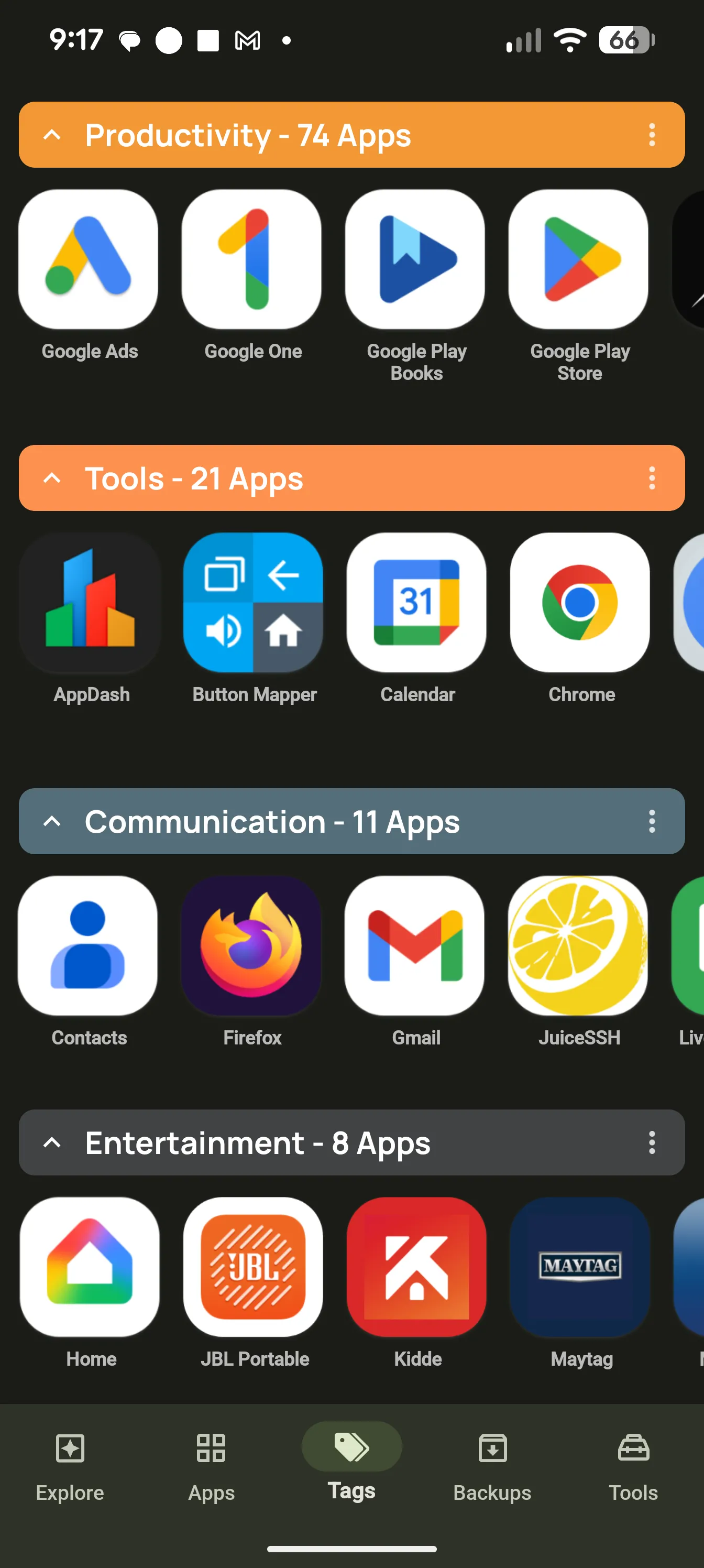
AppDash Tags tab showing color-coded app groups

Tags your way

Create tags like Work, Travel, Banking or Kids, give each a color, and add apps from any list. An app can carry as many tags as you like. Filter the Apps tab by one tag or by several, with an option to match all of them at once.

  • Color-coded tags, renamable at any time
  • Filter any list by tag, with and-matching across tags
  • Tags list sortable by app count or name
  • Tag chips shown on every app row

Auto-tag by category

Let AppDash do the first pass. Auto-tag sorts your apps into Games, Social, Productivity, Entertainment, Music & Audio, Video, News, Photography, Travel and Tools. It uses the Play Store category when Enhanced App Info is on, and Android’s own category otherwise. Edit or replace the result however you like.

  • Ten built-in categories
  • Works offline from Android’s categories
  • Re-run it any time from Settings

Act on a whole tag

A tag is more than a label. Back up every app in a tag, share or save the list, or uninstall the lot. With root or Shizuku you can also force close, disable, clear cache or data, and restore every app in the tag from backup.

  • Back up, share, save or uninstall by tag
  • Force close, disable, wipe cache or data with root or Shizuku
  • Restore all apps in a tag from a backup location
  • Home-screen widget showing one tag’s apps

Notes and personal ratings

Write a note on any app and give it your own star rating, then browse all your notes in one place, sorted by name or rating. With Enhanced App Info on, AppDash can fill a note with the app’s Play Store summary and rating to get you started.

  • Free-text notes and your own star rating
  • Notes screen with search, sort and filters
  • Autofill from the Play Store listing
  • Notes on backups too

Browse by developer

See your apps grouped by the studio that made them, with the developer’s website, total installs, average rating and the rest of their catalog. One tap creates a tag named after the developer. Needs Enhanced App Info.

  • Developer list sorted by app count or name
  • Developer sheet with installs, rating and website
  • Create a tag for a developer in one tap

Share and keep your setup

Share any selection of apps as a list with Play Store links, or copy it as plain text. AppDash can also save its own data, including tags, notes, history and your watchlist, to an encrypted file and load it on a new phone.

  • Share an app list as a file or copy it as text
  • Save a tag’s app list
  • AppDash settings backup and restore, with a purchase

Common questions

Can an app have more than one tag?
Yes. Add as many tags as you like to any app, then filter by one or by several at once.
Do my tags and notes survive a new phone?
Yes, if you save AppDash’s data first. Settings > Backup AppDash data writes an encrypted file with your tags, notes, history and watchlist. Load it on the new phone and your setup is back. This needs a subscription or purchase.
Can I export my app list?
Yes. Select apps in any list and choose Share to send them as a file, or Copy app list to put a plain-text list with Play Store links on the clipboard.

More features

Try it with a full-access preview

Install AppDash and use every feature for 7 days. No ads, no tracking.